
Legal
Texts from Answer with Iris
Last updated: 19 November 2026
Shop details: check the SMS box or pick Email only. Not required to create an account or pay. Unchecked = we email, we do not text that cell.
Answer with Iris sends transactional SMS only — job cards, YES/NO dispatch, a receipt when a tech accepts, one morning callback list, one day-before on-call reminder for that night only, a text to the owner if the technician replies OUT so the owner can pick who covers that night, account and billing alerts to the owner (such as trial and minute alerts), one caller confirmation after the caller says yes on the recorded call. She never takes a card on the call. A trip-fee payment link in the caller's confirmation is not on for any shop yet (see Callers below). Not marketing. Not coupons. We do not buy lists. We do not blast callers. See every sample, with dummy names: Sample texts.
Three ways people opt in
Each person who gets a text from Answer with Iris opted in one of three ways. Each way has its own section below, with the exact wording and a screenshot or public copy of the form:
- Shop owners: an optional, unchecked box on Shop details after login. One confirmation text when they check it.
- Technicians: the owner adds the tech's work cell on Team and checks a required box that the tech agreed (or, for a tech already on Team, confirms it in one press). Iris texts the tech one confirmation.
- Callers: a spoken yes at the end of a recorded call, after Iris reads the disclosures. Only a yes sends their one confirmation text.
How shop owners opt in
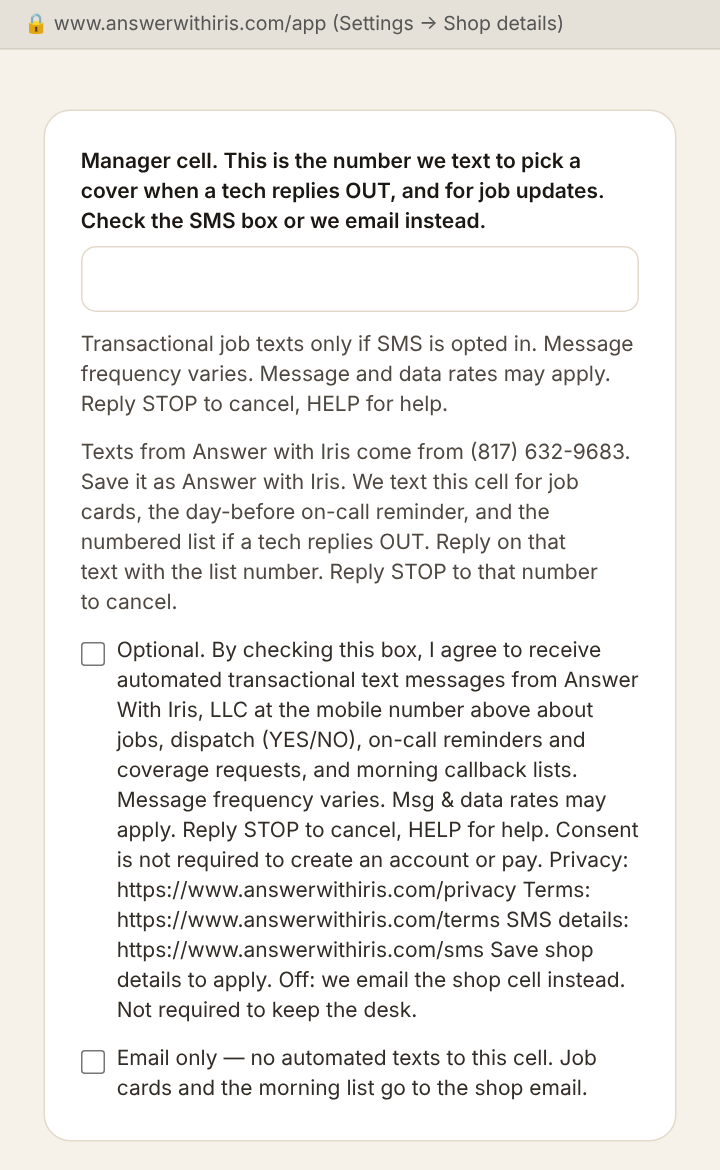
The live checkbox is on Shop details after login at answerwithiris.com/app. Checkout does not ask for SMS consent. This page is the public copy of that exact unchecked box, so a reviewer does not need an account. The manager number goes in Sign in → Settings → Shop details. Type the manager's US mobile, then check the SMS box. That is the number we text for the OUT cover list and job updates. That box is never pre-checked. Skip the box and we email instead. We do not text that cell. Tech work cells are separate: Sign in → Team. Those cells get the day-before on-call text and the YES/NO job card. Do not put the manager number on Team if you want the cover list. All of these texts, including the numbered cover list after OUT, come from (817) 623-5503. Save that number as Answer with Iris. Reply STOP to that number to cancel. Reply HELP for help.
The box covers texts and automated job calls. An owner who checked it before Nov 18, 2026, when it covered texts only, keeps getting texts; to allow calls, they press Turn calls on under the box. The words right above that button say what pressing it agrees to, for the cell on file (shown below). Pressing it records the owner's consent to calls at once, with the time, that cell and those exact words; there is nothing else to save. An owner who pressed 9 on a call turns calls back on the same way. Iris calls an owner only when no technician has taken an emergency. Press 9 on a call to stop calls; reply STOP to stop texts and calls.
Shop details form: SMS consent (public copy of the live form — the box is never pre-checked)
Transactional job texts only if SMS is opted in. Message frequency varies. Message and data rates may apply. Reply STOP to cancel, HELP for help.
You can save Shop details, create your account, and pay without checking this box. Unchecked means we email instead of texting.
Save with the box checked and we text that number one confirmation: “Answer with Iris: You're signed up for job texts and automated calls (which may use an AI voice) for River City Mechanical. Message frequency varies. Msg & data rates may apply. Reply HELP for help, STOP to cancel texts and calls. Press 9 on a call to stop calls.”
Shop details: the Turn calls on button (public copy)
By pressing ‘Turn calls on,’ I agree to receive automated calls that may use an AI voice from Answer With Iris, LLC at (555) 555-0100 about emergency jobs no technician has taken, jobs, dispatch (YES/NO), on-call reminders and coverage requests, morning callback lists, and account and billing alerts. Consent is not required to create an account or pay. Reply STOP to texts or press 9 on a call to stop.
Pressing it records the consent at once and texts that number the same one confirmation.
Message frequency: varies with inbound calls. A busy night may be several texts; a quiet night may be none.
Message and data rates may apply depending on your mobile plan.
Help & Stop: Reply HELP for help or STOP to cancel any time. Support: support@answerwithiris.com
Screenshot of the live Shop details form (after login):
How technicians opt in
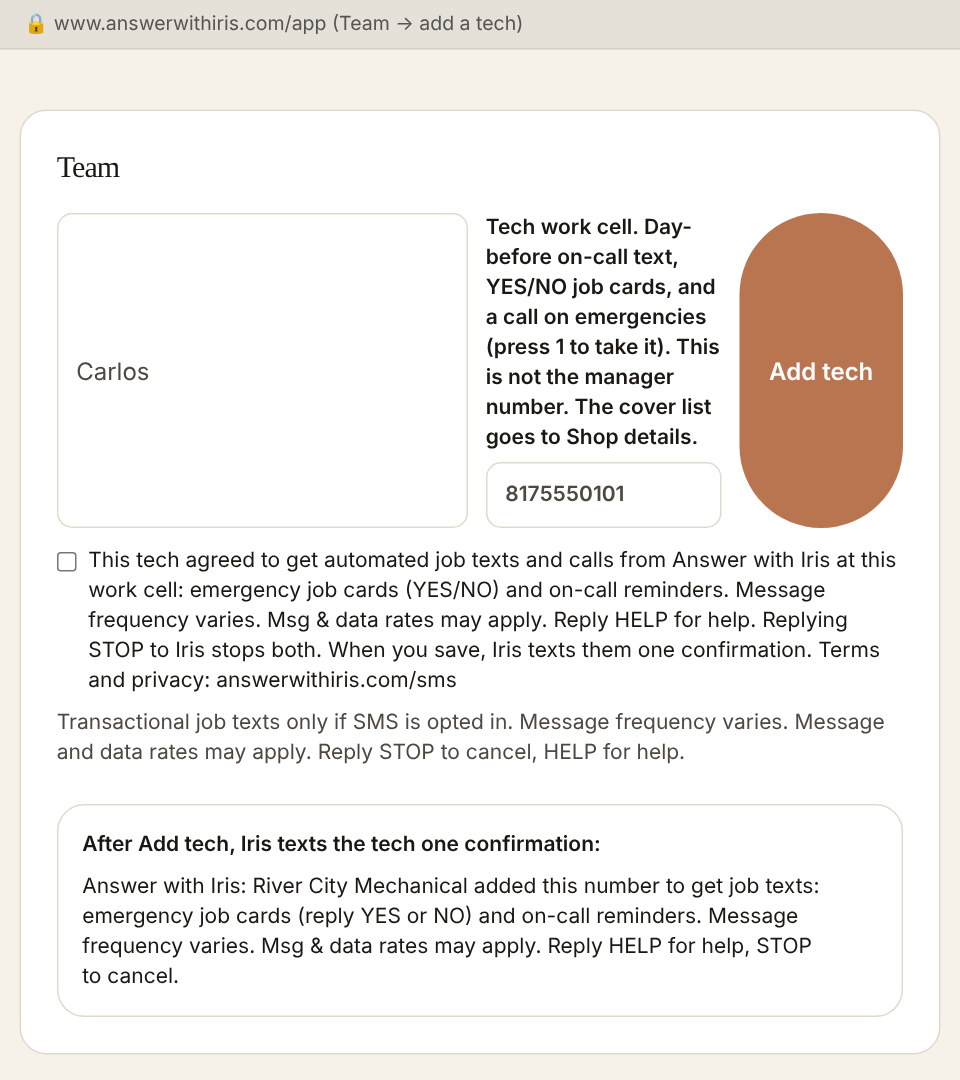
The shop owner adds a work cell on Team. That number gets job cards, YES/NO, and one text at 3:00 p.m. shop time the day before their on-call night. Each night gets its own text. Each night runs until the shop opens the next morning (7:00 a.m. on days the shop is closed). Saturday’s text is for Sunday only. A day set to Off sends nothing. The reminder does not ask them to reply YES or NO. If they cannot take the night, they reply OUT. On call more than one night coming up? Iris asks which night, and they reply with the day, like SAT or SUN. The owner gets a numbered list by text (only if the owner checked the SMS box; otherwise by email) and replies with the number. That night only. The week does not change. The owner confirms it is a work cell. YES and NO are job replies, not subscribe keywords. OUT, a day like SAT, and the owner's list number are on-call replies, not keywords. All of these texts, including the numbered cover list after OUT, come from (817) 623-5503. Save that number as Answer with Iris. Reply STOP to that number to cancel. Reply HELP for help.
On a true emergency, Iris may also call that work cell, using an automated AI voice, from (817) 632-9683 about that job: press 1 to take it, 2 to pass. One more call if it is missed. These calls are about the job only, never marketing. They go only to a cell whose tech agreed to automated job calls, which the shop owner confirms on Team when adding the tech or changing their cell (or with one press, Text to confirm, for a tech already on Team), and whose tech then replied OK to Iris's confirmation text. Press 9 on a call to stop calls to that cell; the job texts still come. Replying STOP to Iris's texts stops the calls too. The owner can turn the calls off on Team. If no technician takes the job, Iris may call the shop owner's cell the same way, if the owner agreed to these calls on Shop details (the SMS box, or Turn calls on under it).
Team form: add a tech (public copy of the live form — the box is required and never pre-checked)
When the owner taps Add tech (or changes a tech's cell), Iris texts that number one confirmation: “Answer with Iris: River City Mechanical added this number for job texts and calls: emergency job cards (reply YES or NO), emergency job calls (press 9 to stop calls), and on-call reminders. Msg frequency varies. Msg & data rates may apply. Reply OK to confirm, HELP for help, STOP to cancel.”
For a tech already on Team, the owner can confirm in one press. The button reads “Text Carlos to confirm”, and next to it: “By pressing, you confirm Carlos agreed to get automated job texts and calls from Answer with Iris at this work cell: emergency job cards (YES/NO), emergency job calls, and on-call reminders. Msg & data rates may apply. Reply HELP for help; STOP stops both; pressing 9 on a call stops calls. Iris texts them once; calls start only after they reply OK. Terms and privacy: answerwithiris.com/sms” Pressing it records the owner's confirmation and sends the same one confirmation text. Calls start only after the tech replies OK.
Team: one-press confirm for a tech already on Team (public copy)
By pressing, you confirm Carlos agreed to get automated job texts and calls from Answer with Iris at this work cell: emergency job cards (YES/NO), emergency job calls, and on-call reminders. Msg & data rates may apply. Reply HELP for help; STOP stops both; pressing 9 on a call stops calls. Iris texts them once; calls start only after they reply OK. Terms and privacy: answerwithiris.com/sms
Screenshot of the live Team form (after login):
How callers opt in
One transactional confirmation to the number they gave on that recorded call, and only if they said yes when Iris asked. Not marketing. Not a list. Reply STOP to cancel, HELP for help. Owner texts are a separate opt-in on Shop details; tech texts are a separate opt-in on Team. A caller's confirmation comes from the same number, (817) 623-5503; replies to it, STOP and HELP work the same there.
Every call starts with a recorded AI disclosure. Iris opens every call with: “Thanks for calling River City Mechanical. This is Iris, the shop’s AI assistant, and this call is recorded. If anyone is in immediate danger, hang up and call 911. Si habla español, puedo ayudarle. How can I help?”
After the caller's request is handled, at the end of the call, Iris asks: “Want one text from Answer with Iris confirming this? Message and data rates may apply. Reply STOP to opt out, HELP for help. Terms at answerwithiris.com/sms. Yes or no?” Only a clear yes sends a text. A no, or no answer, sends nothing. The confirmation starts with the shop’s name and ends “Sent by Answer with Iris. Msg & data rates may apply. Reply HELP for help, STOP to opt out. We don't share your number. Terms: answerwithiris.com/sms”. We never share callers' numbers for marketing.
Sample call (dummy names): the end of a recorded call, and the one text that follows
Iris: I've got your request in for the no heat at 412 Oak Street. The shop will call you back today.
Iris: Want one text from Answer with Iris confirming this? Message and data rates may apply. Reply STOP to opt out, HELP for help. Terms at answerwithiris.com/sms. Yes or no?
Caller: Yes, go ahead.
Iris: Thanks. It's on the way.
Text the caller receives, once: River City Mechanical: Confirmation. no heat at 412 Oak Street. The shop will call you back today. Call 817-555-0100. Sent by Answer with Iris. Msg & data rates may apply. Reply HELP for help, STOP to opt out. We don't share your number. Terms: answerwithiris.com/sms
If they reply HELP: “River City Mechanical: Answer with Iris sends booking updates for River City Mechanical. To reach the shop, call 817-555-0100. Reply STOP to opt out.”
Trip-fee link (not on for any shop yet): if the shop turns it on, and the caller agreed to the shop’s trip fee on the call, Iris asks instead: “Want one text from Answer with Iris confirming this, with a link to pay the trip fee you agreed to? Message and data rates may apply. Reply STOP to opt out, HELP for help. Terms at answerwithiris.com/sms. Yes or no?” Only then can that one confirmation include one link on answerwithiris.com to pay that trip fee.
We keep a record of each yes (the question, the caller’s words, when, the number, and the text sent) for 4 years and 6 months. See the Privacy Policy.
START and UNSTOP
START and UNSTOP re-enable a number that previously replied STOP. They are not a public join keyword. New users cannot subscribe by texting START. New opt-in is only the three ways above: the Shop details box (owners), the Team form (techs), and a spoken yes on the recorded call (callers).
Opt-out and help
Reply STOP to cancel. Reply HELP for help, or email support@answerwithiris.com. To stop dispatch calls, press 9 during a call or reply STOP to our texts. Message frequency varies. Message and data rates may apply. Carriers are not liable for any delayed or undelivered messages.
Mobile numbers are not shared
Mobile information will not be shared with third parties or affiliates for marketing or promotional purposes. Text messaging originator opt-in data and consent will not be shared with any third parties. All the above categories exclude text messaging originator opt-in data and consent; this information won’t be shared with any third parties.
What reviewers need
Public pages: Privacy · Terms. Owner consent (texts and dispatch calls) is a separate, optional, unchecked box on Shop details; paying does not require it. Tech consent is the required box on the Team form, then one confirmation text. Caller consent is a spoken yes on the recorded call, after the disclosures; each yes is kept on record. Screenshots and public copies of each are above: owners, techs, callers. Opt-out is STOP. Help is HELP or support@answerwithiris.com.